Showing posts with label IBM. Show all posts
Showing posts with label IBM. Show all posts
Tuesday, 26 May 2015
Monday, 6 April 2015
Notification Services in SQL Server 2005
SQL Server Notification Services is used for developing and deploying applications that generate and send notifications. Notifications are personalized messages sent to a device that subscribes to them. A subscription defines the preference of the subscriber for a specific type of event. For example, a subscriber can specify a preference to the notification application such as “Notify me when new content is added to the Web site.” The notification application in this example is the Web site. The subscriber could be the editor of the Web site or someone responsible for managing its content. The triggering event is the addition of new content. Thus, a notification will be sent to the subscriber when the triggering event occurs. The notification can be scheduled on a weekly, daily, or hourly basis. SQL Server Notification Services can be used to send a notification to a wide variety of devices, such as a subscriber’s cell phone, personal digital assistant (PDA), Windows Messenger or e-mail account.
Terminologies in Notification services
- Subscriber is a person or application that subscribes to and receives notifications.
- Subscription is a request for specific information to be sent to an e-mail address or a device.
- Event is a piece of information that the subscriber may be interested in. The triggering event can be something like an increase or decrease in the price of a stock.
- Notification is a message that contains information about the triggering event.
There are three major pieces to each notification service. Let’s briefly define and explain each.
Events
For a notification to be sent, there has to be some form of trigger. In SQL NS such a trigger is defined as an “Event”. Events can be triggered by certain actions, or they can be in time intervals, it’s up to the designer. All of the events for a notification service can be defined in the ADF for the service.
An example of an event might be that bob wants to know when his flowers were delivered to his girlfriends house, so he subscribes to the notification service that the flower shop provides. The flower shop has defined an event in their service that generates a notification when the delivery person calls in to confirm delivery. Once the event is generated, the notification is created and delivered to bob via SMS messaging.
An example of a timed event might be that a sale person from XYZ corp. needs an updated contact list each morning before he starts his day. An event is created in the notification services that creates a notification with his updated contact list and sends it to his mobile phone in the form of a smart messaging SMS message. With the press of a button, he accepts the message and his contact list is updated.
Events are created in many ways, most commonly they are pulled from SQL databases, or system logs. When the event is defined in the ADF the method for retrieving the event data is also defined.
Notifications
A notification is the actually data that is sent to a subscriber, it is basically a formatted form of the data that was retrieved when the event that goes with this notification was fired. The contents and format of the notifications that a service supports are defined in the ADF.
Microsoft has provided an XSLT content formatter to make our lives easier in respect to notifications. It allows us to apply an XSLT transform to the raw notification data. This allows us to easily prepare a notification for display to a subscriber.
Subscriptions
A subscriber is the actual real end user of the notification service, this is the guy who wants to be notified of his rising stock so he can buy his yacht. When SQL NS creates the notification service, it creates in SQL Server a database that is just for holding subscriber information. To add subscribers, the developer needs to create some sort of a subscription application, this may sound kind of like being left out cold, but that is not the case. The subscription application is left fully to the imagination of the designers of the service, but Microsoft has provided some tools that make it much easier to build. We don’t have to know the full ER model of the subscription database because we can simply utilize the managed components Microsoft has provided for us to add subscribers.
So, simply create an application for gathering the required information from a subscriber, and use the classes provided in the
Microsoft.SqlServer.NotificationServices namespace. (note these are .NET classes)
Subscribers can choose the events they want to subscribe to, the format of the notifications they want, and even the media they want notifications sent to, and yes they can even choose more than one.
Of course all these features don’t program themselves, but they can easily be added to a service once you have a good handle on build ADFs. Notification services range from the very simple to the extremely complex. You can build one in a day or in a month. It all just depends on what is required for your situation.
Ref:
Friday, 23 May 2014
What is the difference between the Response.Write() and Response.Output.Write() methods?
The Response.Write() method allows you to write the normal output; whereas, the Response.Output.Write() method allows you to write the formatted output.
How to implement singleton design pattern in C#?
In singleton pattern, a class can only have one instance and provides access point to it globally.
Eg:
[csharp]
Public sealed class Singleton
{
Private static readonly Singleton _instance = new Singleton();
}
[/csharp]
Eg:
[csharp]
Public sealed class Singleton
{
Private static readonly Singleton _instance = new Singleton();
}
[/csharp]
What is the difference between public, static and void?
All these are access modifiers in C#. Public declared variables or methods are accessible anywhere in the application. Static declared variables or methods are globally accessible without creating an instance of the class. The compiler stores the address of the method as the entry point and uses this information to begin execution before any objects are created. And Void is a type modifier that states that the method or variable does not return any value.
What are the different types of Caching?
There are three types of Caching:
Output Caching: stores the responses from an asp.net page.
Fragment Caching: Only caches/stores the portion of page (User Control)
Data Caching: is Programmatic way to Cache objects for performance.
Define Constructors?
A constructor is a member function with the same name as its class. The constructor is invoked whenever an object of its associated class is created.It is called constructor because it constructs the values of data members of the class.
Please briefly explain the usage of Global.asax?
Global.asax is basically ASP.NET Application file. It’s a place to write code for Application-level events such as Application start, Application end, Session start and end, Application error etc. raised by ASP.NET or by HTTP Modules.
There is a good list of events that are fired but following are few of the important events in Global.asax:
Application_Initoccurs in case of application initialization for the very first time.Application_Startfires on application start.Session_Startfires when a new user session startsApplication_Erroroccurs in case of an unhandled exception generated from application.Session_Endfires when user session ends.Application_Endfires when application ends or time out.
Thursday, 22 May 2014
What is SELF JOIN and when would you use it?
- The SQL SELF JOIN is used to join a table to itself
- You use a self join when a table references data in itself.
- SQL self-join simply is a normal join which is used to join a table to itself.
Example:
SELECT a.column_name, b.column_name...
FROM table1 a,table1 b
WHERE a.common_field = b.common_field;
Tuesday, 20 May 2014
Explain “AutoPostBack”?
If we want the control to automatically post back in case of any event, we will need to check this attribute as true. Example on a Combo Box change we need to send the event immediately to the server side then set the “AutoPostBack” attribute to true.
Page object has an "IsPostBack" property, which can be checked to know that is the page posted back.

Friday, 16 May 2014
Surrogate Key in SQL Server?
Introduction
A Surrogate Key in SQL Server is a unique identifier for each row in the table. It is just a key. Using this key we can identify a unique row. There is no business meaning for Surrogate Keys. This type of key is either database generated or generated via another application (not supplied by user).
A Surrogate Key is just unique identifier for each row and it may use as a Primary Key. There is only requirement for a surrogate Primary Key, which is that each row must have a unique value for that column. A Surrogate Key is also known as an artificial key or identity key. It can be used in data warehouses.
A Surrogate Key should have the following characteristics:
A Surrogate Key in SQL Server is a unique identifier for each row in the table. It is just a key. Using this key we can identify a unique row. There is no business meaning for Surrogate Keys. This type of key is either database generated or generated via another application (not supplied by user).
A Surrogate Key is just unique identifier for each row and it may use as a Primary Key. There is only requirement for a surrogate Primary Key, which is that each row must have a unique value for that column. A Surrogate Key is also known as an artificial key or identity key. It can be used in data warehouses.
A Surrogate Key should have the following characteristics:
- Unique Value
- The key is generated by the system, in other words automatically generated
- The key is not visible to the user (not a part of the application)
- It is not composed of multiple keys
- There is no semantic meaning of the key
Generally, a Surrogate Key is a sequential unique number generated by SQL Server or the database itself. The purpsoe of a Surrogate Key is to act as the Primary Key. There is a slight difference between a Surrogate Key and a Primary Key. Ideally, every row has both a Primary Key and a Surrogate Key. The Primary Key identifies the unique row in the database while the Surrogate Key identifies a unique entity in the model.
Note that Surrogate Keys are never used with any business logic other than simple Create, Read, Update and Delete (CRUD) operations.
Example of Surrogate Key
Note that Surrogate Keys are never used with any business logic other than simple Create, Read, Update and Delete (CRUD) operations.
Example of Surrogate Key
- Identity Column in SQL Server
- GUID (Globally Unique Identifier)
- UUID (Universally Unique Identifier)
How can we implement Surrogate Key?
There are several ways to implement Surrogate Keys as in the following:
There are several ways to implement Surrogate Keys as in the following:
- Auto Incremental key in DatabaseA Surrogate Key can be implementing by an auto incremented key. SQL Server supports an IDENTITY column to perform the auto increment feature. It allows a unique number to be generated when a new record is inserted into the database table.--Syntax for Introducing Auto identity column with Create Table.CREATETABLE [dbo].[EmployeeMaster]([EmployeeId] [int]IDENTITY(1,1)NOT NULL,[EmployeeCode] [varchar](25)NULL,[EmployeeName] [varchar](50)NULL,[EmailAddress] [varchar](50)NULL,)--Syntax for Introducing Auto identity column with Create Table.ALTERTABLE EmployeeMasterADD ID INTIDENTITY(1,1)
- Manual Incremental key in DatabaseA Surrogate Key can be implemented by manual incremental key. Using the max() function we can find a maximum value of a column and this value is incremented by one. This approach suffers from a performance problem when a table has a large amount of data.--ExampleDECLARE @newId INTSELECT @newId = ISNULL(MAX(EmployeeId),0)+ 1 FROM EmployeeMasterPRINT @newId--The varible @newId can be used as indentifier of newly inserted data.
- Globally Unique Identifiers (GUID)GUID is a Microsoft standard that extends Universally Unique Identifier (UUID). Using a NEWID() function we can generate a new GUID in SQL Server. It is a 16 byte GUID.--ExampleDECLARE @newID UNIQUEIDENTIFIERSET @newID = NEWID()--The varible @newId can be used as indentifier of newly inserted data.
NEWSEQUENTIALID() can be used with DEFAULT constraints on the table column of type uniqueidentifier. We cannot use the NEWSEQUENTIALID() function as a reference in queries.
- Universally unique identifier (UUID)
UUID is 128 bit values that are created from hash of the ID of Ethernet card and current data time of SQL Server.
Advantages of Surrogate Key
- A Surrogate Key does not change so the application cannot lose their reference row in the database.
- If the Primary Key is changed then the related foreign key does not change across the database because the Surrogate Key is used as a reference key. In other words, the Surrogate Key value is never changed, so the foreign key values become stable.
- A Surrogate Key is most often a compact data type such as an integer. A Surrogate Key is less expensive in a "Join" than the compound key.
- Business logic does not something in this key.
- A table always has a uniform Surrogate Key, so some tasks can be easily automated by writing the code table independently.
- There is no locking contention because it is a unique identifier.
- A Surrogate Key does not require an extra field; that helps to save space in the database.
- The relationship between any two tables is simple and consistent in SQL code expressions.
- Object Relational Mapping (ORM) frameworks such as Entity Framework, N-Hibernate, and so on are designed to work optimally with Surrogate Keys. It is very simple to implement them over the composite keys.
- It allows for a higher degree of normalization, so data is not duplicated within the database.
Disadvantages of Surrogate Key
- Additional index is required.
- It cannot be used as a search key because it is not related to any business logic or it is independent of any business logic.
- There is always a requirement to join to the main table when data is selected from a child table.
- It increases the sequential number by a random amount.
- There is some administrative overhand to maintain a Surrogate Key.
- Extra disk space required to store a Surrogate Key.
How Surrogate Key is differing from the Natural Key?
The alternative to a Surrogate Key is Natural Keys. A Natural Key is a true unique identifier in the database. It is a single value or composite value that has business meaning. The Natural Key can be one or more columns with any data type. If there is no Surrogate Key on table then there is no need to create a unique index or sequence on a database table, so it helps us to reduce administrative overhead.
Disadvantages of Natural Key
The alternative to a Surrogate Key is Natural Keys. A Natural Key is a true unique identifier in the database. It is a single value or composite value that has business meaning. The Natural Key can be one or more columns with any data type. If there is no Surrogate Key on table then there is no need to create a unique index or sequence on a database table, so it helps us to reduce administrative overhead.
Disadvantages of Natural Key
- A query join may become complex because the Natural Key can have one or more columns.
- It is a reduced normalization form.
- It is very difficult to use and time consuming with ORM because ORM is designed to work best with Surrogate Keys.
- The key type is not consistent.
- More work is required to change a Natural Key when the foreign key relationship has been built by a Natural Key.
- A Natural Key is larger than a Surrogate Key.
- A Natural Key can be any data type, so it might require a long execution time in a "join" query. For example, if there is a VARCHAR data type as a Natural Key type then the join between two tables may take more time to produce output.
- A Natural Key is assigned by the application, so there is no way to know whether a record is new or an existing record.
Conclusion
A Surrogate Key is unique in the database table; it is just like an artificial or alternative key to a Primary Key because a Primary Key may be alphanumeric or a composite key. A Surrogate Key is always unique per table.
Surrogate Keys offer many benefits. Simplicity, consistency and stability, makes the use of an ORM extremely feasible. We can use a Natural Key instead of A Surrogate Key when A Natural Key is small and this key is never updated.
A Surrogate Key is unique in the database table; it is just like an artificial or alternative key to a Primary Key because a Primary Key may be alphanumeric or a composite key. A Surrogate Key is always unique per table.
Surrogate Keys offer many benefits. Simplicity, consistency and stability, makes the use of an ORM extremely feasible. We can use a Natural Key instead of A Surrogate Key when A Natural Key is small and this key is never updated.
Thursday, 15 May 2014
What is ViewState?
It is a state management technique in asp.net. ASP.NET Viewstate is preserving the data between the requests or postbacks and stored in hidden fields on the page. if you open the source of the aspx page you will see like
To disable viewstate in the application we need to configure in page for particular page only or web.config file for application level
To disable viewstate in page level
Add the following line in web.config file to disable the viewstate in application level
<input type="hidden" name="__VIEWSTATE"
            value="dDwyMTQxMjc4NDIxO3Q8O2w8aTw4Pjs+O2w8dDwfg==>
To disable viewstate in the application we need to configure in page for particular page only or web.config file for application level
To disable viewstate in page level
<%@  Page Language="C#" AutoEventWireup="true" CodeBehind="..."
    MasterPageFile..." Inherits="..."  EnableViewState="false" %>
Add the following line in web.config file to disable the viewstate in application level
<pages enableViewState="false" />
Saturday, 10 May 2014
What is cross Join in SQL Server?
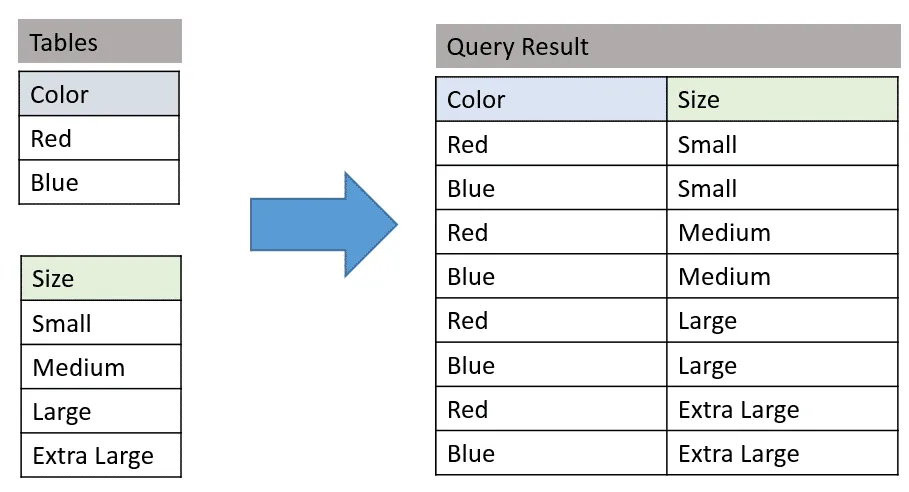
In SQL, the CROSS JOIN is used to combine each row of the first table with each row of the second table. It is also known as the Cartesian join since it returns the Cartesian product of the sets of rows from the joined tables.
A cross join is used when you wish to create combination of every row from two tables. All row combinations are included in the result; this is commonly called cross product join. A common use for a cross join is to create obtain all combinations of items.
Example-
Suppose that we are sitting in a coffee shop and we decide to order breakfast. Shortly, we will look at the menu and we will start thinking of which meal and drink combination could be more tastier. Our brain will receive this signal and begin to generate all meal and drink combinations.

Unlike the
INNER JOIN or LEFT JOIN, the cross join does not establish a relationship between the joined tables.SELECT *FROM t1CROSS JOIN t2
Suppose you wanted to return a report showing every combination of color and size as shown in our sample data below:
Friday, 9 May 2014
Difference between JavaScript and jQuery?
- JQuery is, a library of JavaScript code.
- JQuery is a fast and concise JavaScript Library that simplifies HTML document traversing, event handling, animating, and Ajax interactions for rapid web development.
- JavaScript is a language. jQuery is a library built with JavaScript to help JavaScript programmers who are doing common web tasks.
- jQuery was written using JavaScript, and is a library to be used by JavaScript.
- jQuery is a multi-browser (cf. cross-browser) JavaScript library designed to simplify the client-side scripting of HTML
- jQuery is a wrapper of JavaScript, with much pre-written functionality.
JQuery is a framework for writing javascript tasks in a easier way. JQuery it is written in javascript. Also, I should mention that browsers parse only html and css files as also js scripts. Hence, all javascript frameworks (jQuery, AngularJS, etc) are written in javascript. They provide you the oportunity to write js code easier but under the hook they are all written in javascript.
Example:
Say we have the following input element
<input id="button1" type="button" value="clickMe"/>
Also say that we want when someone click on the button to have an alert box showing to the user a 'Hello' message.
Then the code in javascipt would be:
document.getElemementById("button1").addEventListener('click', function(){
    alert("Hello");
});
Using JQuery the above would be written as follows:
$('#button1').click(function(){ alert("Hello"); });
Using JQuery makes things more clear.
As you can see all JQuery is, is JavaScript.
What are the different State management in ASP.NET?
State management is the process by which you maintain state and page information over multiple requests for the same or different pages.
There are 2 types State Management:
1. Client – Side State Management
This stores information on the client's computer by embedding the information into a Web page, a uniform resource locator (url), or a cookie. The techniques available to store the state information at the client end are listed down below:
a. View State – Asp.Net uses View State to track the values in the Controls. You can add custom values to the view state. It is used by the Asp.net page framework to automatically save the values of the page and of each control just prior to rendering to the page. When the page is posted, one of the first tasks performed by page processing is to restore view state.
b. Control State – If you create a custom control that requires view state to work properly, you should use control state to ensure other developers don’t break your control by disabling view state.
c. Hidden fields – Like view state, hidden fields store data in an HTML form without displaying it in the user's browser. The data is available only when the form is processed.
d. Cookies – Cookies store a value in the user's browser that the browser sends with every page request to the same server. Cookies are the best way to store state data that must be available for multiple Web pages on a web site.
e. Query Strings - Query strings store values in the URL that are visible to the user. Use query strings when you want a user to be able to e-mail or instant message state data with a URL.
2. Server – Side State Management
a. Application State - Application State information is available to all pages, regardless of which user requests a page.
b. Session State – Session State information is available to all pages opened by a user during a single visit.
Both application state and session state information is lost when the application restarts. To persist user data between application restarts, you can store it using profile properties.
http://www.codeproject.com/Articles/492397/State-Management-in-ASP-NET-Introduction
What is an IIS application pool?
Application pools allow you to isolate your applications from one another, even if they are running on the same server. This way, if there is an error in one app, it won't take down other applications.
An Application Pool can contain one or more applications and allows us to configure a level of isolation between different Web applications. For example, if you want to isolate all the Web applications running in the same computer, you can do this by creating a separate application pool for every Web application and placing them in their corresponding application pool. Because each application pool runs in its own worker process, errors in one application pool will not affect the applications running in other application pools. Deploying applications in application pools is a primary advantage of running IIS 6.0 in worker process isolation mode because you can customize the application pools to achieve the degree of application isolation that you need.
Assume scenario where swimmers swim in swimming pool in the areas reserved for them.what happens if swimmers swim other than the areas reserved for them,the whole thing would become mess.similarly iis uses application pools to seperate one process from another.
An application pool is a group of one or more URLs that are served by a worker process or set of worker processes.Application pools are used to separate sets of IIS worker processes that share the same configuration and application boundaries. Application pools used to isolate our web application for better security, reliability, and availability and performance and keep running with out impacting each other .

An Application Pool can contain one or more applications and allows us to configure a level of isolation between different Web applications. For example, if you want to isolate all the Web applications running in the same computer, you can do this by creating a separate application pool for every Web application and placing them in their corresponding application pool. Because each application pool runs in its own worker process, errors in one application pool will not affect the applications running in other application pools. Deploying applications in application pools is a primary advantage of running IIS 6.0 in worker process isolation mode because you can customize the application pools to achieve the degree of application isolation that you need.
Assume scenario where swimmers swim in swimming pool in the areas reserved for them.what happens if swimmers swim other than the areas reserved for them,the whole thing would become mess.similarly iis uses application pools to seperate one process from another.
An application pool is a group of one or more URLs that are served by a worker process or set of worker processes.Application pools are used to separate sets of IIS worker processes that share the same configuration and application boundaries. Application pools used to isolate our web application for better security, reliability, and availability and performance and keep running with out impacting each other .
Additionally, applications pools allow you to separate different apps which require different levels of security.
Wednesday, 23 April 2014
SQL Server Stored Procedure?
Defination:
a) Stored procedure allows modular programming.
b) Stored Procedure allows faster execution.
c) Stored Procedure can reduce network traffic.
d) Stored procedures provide better security to your data
-In database management systems (DBMSs), an operation that is stored with the database server. Typically, stored procedures are written in SQL. They're especially important for client-serverdatabase systems because storing the procedure on the server side means that it is available to all clients.
-A stored procedure is a group of sql statements that has been created and stored in the database. Stored procedure will accept input parameters so that a single procedure can be used over the network by several clients using different input data. Stored procedure will reduce network traffic and increase the performance. If we modify stored procedure all the clients will get the updated stored procedure
-A stored procedure is a group of sql statements that has been created and stored in the database. Stored procedure will accept input parameters so that a single procedure can be used over the network by several clients using different input data. Stored procedure will reduce network traffic and increase the performance. If we modify stored procedure all the clients will get the updated stored procedure
Advantages:
a) Stored procedure allows modular programming.
You can create the procedure once, store it in the database, and call it any number of times in your program.
b) Stored Procedure allows faster execution.
If the operation requires a large amount of SQL code is performed repetitively, stored procedures can be faster. They are parsed and optimized when they are first executed, and a compiled version of the stored procedure remains in memory cache for later use. This means the stored procedure does not need to be reparsed and reoptimized with each use resulting in much faster execution times.
c) Stored Procedure can reduce network traffic.
An operation requiring hundreds of lines of Transact-SQL code can be performed through a single statement that executes the code in a procedure, rather than by sending hundreds of lines of code over the network.
d) Stored procedures provide better security to your data
Users can be granted permission to execute a stored procedure even if they do not have permission to execute the procedure's statements directly.
In SQL we are having different types of stored procedures are there
a) System Stored Procedures
b) User Defined Stored procedures
c) Extended Stored Procedures
System Stored Procedures:
System stored procedures are stored in the master database and these are starts with a sp_ prefix. These procedures can be used to perform variety of tasks to support sql server functions for external application calls in the system tables
User Defined Stored Procedures:
User Defined stored procedures are usually stored in a user database and are typically designed to complete the tasks in the user database. While coding these procedures don’t use sp_ prefix because if we use the sp_ prefix first it will check master database then it comes to user defined database
Extended Stored Procedures:
Extended stored procedures are the procedures that call functions from DLL files. Now a day’s extended stored procedures are depreciated for that reason it would be better to avoid using of Extended Stored procedures.
Overview of SQL Server Stored Procedure
Overview of SQL Server Stored Procedure


Subscribe to:
Posts (Atom)
-
Connection pool is the collection of new, open and all type of database connections. Opening database connection is a time consuming op...
-
alert() dialog The alert() dialog box is used to communicate a message to the user (generally warnings of missed actions). For example, ...
